 KeyLens
 EN
 VI
KeyLens user guide
How to use every KeyLens feature on Etsy and what each number means, so you can find niches, improve listings and watch competitors faster.
Each 1 on a screenshot matches the same number in the table right below it. The extension interface is in Vietnamese, so button names are shown as they appear, with their English meaning. Screenshots use sample data.
Install and activate
- Get the keylens.zip file from the admin and unzip it.
- Open Chrome, go to
chrome://extensionsand turn on Developer mode (top right). - Click Load unpacked and choose the unzipped keylens folder.
- Click the KeyLens icon in the Chrome toolbar (pin it for easy access), enter your name or email and click Gửi yêu cầu mã (Request a code).
- Send the reference code shown in the popup to the admin to receive a 6-digit confirmation code, then enter it in the popup. Reload Etsy and you are ready.
chrome://extensions.Settings popup
Click the KeyLens icon in the toolbar to open it. After changing settings click Lưu (Save) and reload Etsy.
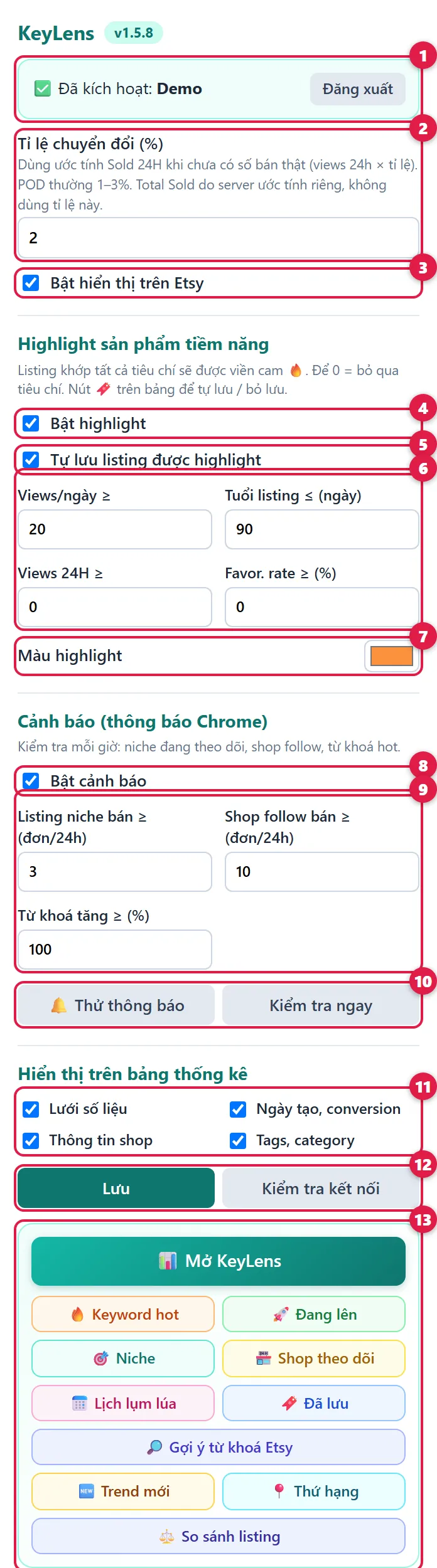
| 1 | Activation | Your account status. Click Đăng xuất (Sign out) to switch accounts. |
| 2 | Conversion rate | Used to estimate Sold 24H for listings KeyLens has only just started tracking. POD is usually 1–3%; the default 2% is fine. |
| 3 | Show on Etsy | Turn off to hide the KeyLens panels on Etsy for a while. |
| 4 | Highlight | Listings that match all rules in item 6 get an orange outline and a 🔥 Hot badge, so promising products stand out while you browse. |
| 5 | Auto-save highlighted | Promising listings are added to the Saved listings tab for later. |
| 6 | Highlight rules | Minimum views per day, maximum listing age, minimum 24H views, minimum favorite rate. Set 0 to ignore a rule. |
| 7 | Highlight color | Outline color for promising listings. |
| 8 | Alerts | Get Chrome notifications (checked every hour) when something worth a look happens. Click a notification to open the matching tab. |
| 9 | Alert thresholds | Alert when a listing in one of your niches sells N orders in 24h, when a followed shop sells N orders in 24h, or when a hot keyword grows by X%. |
| 10 | Test / Check now | Preview how notifications look, or check alerts right away. If nothing appears, allow notifications for Google Chrome in your Windows settings. |
| 11 | Panel sections | Choose what the stats panel shows: number grid, dates / conversion, shop info, tags / category. |
| 12 | Save / Test connection | Save your settings, or check that KeyLens is working. |
| 13 | Open KeyLens | Open the full KeyLens dashboard, or jump straight to a tab. |
Etsy search page
Search Etsy as usual. KeyLens adds a toolbar above the results and a stats panel under each product.
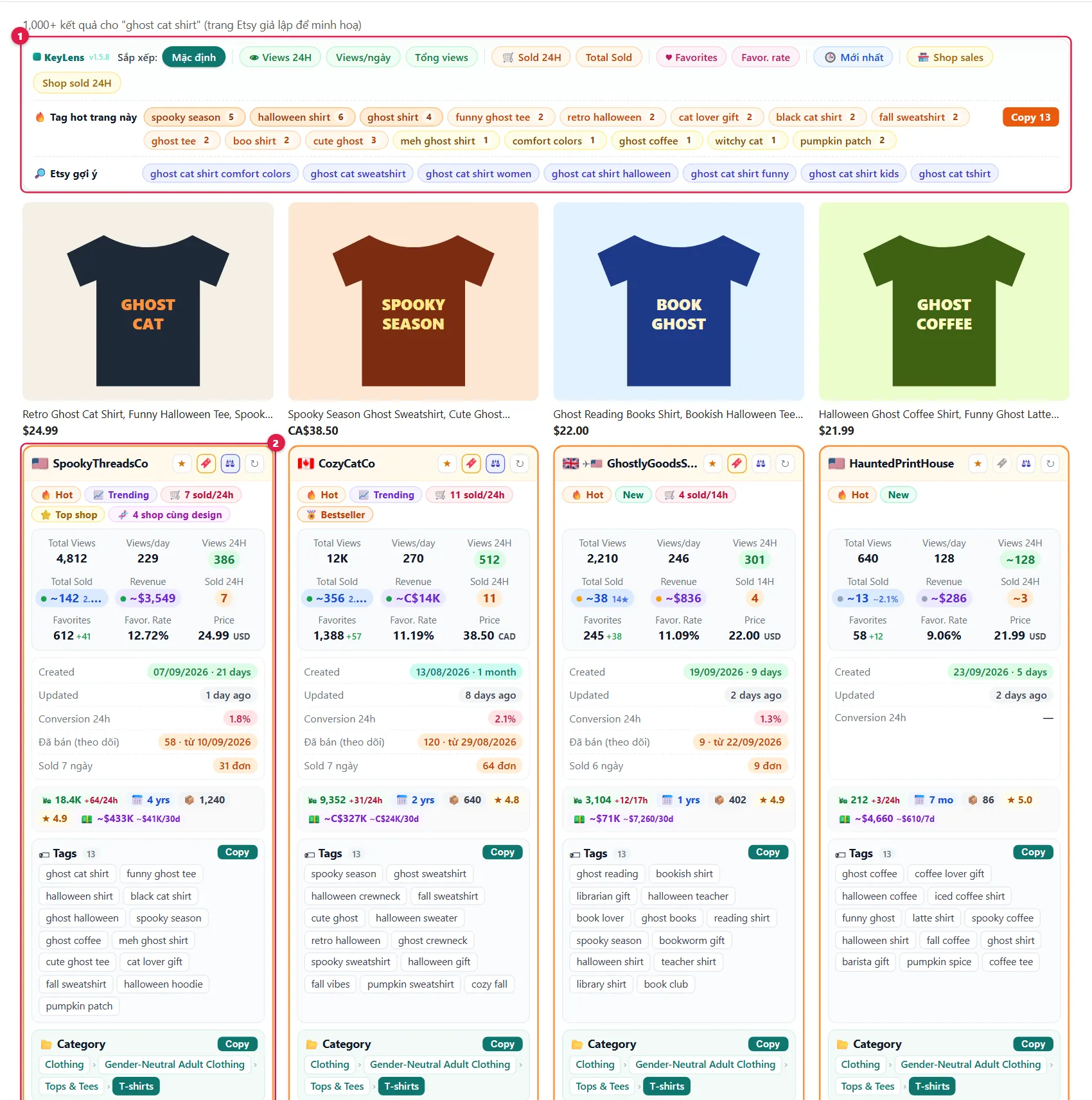
| 1 | KeyLens toolbar | Re-sort the results, see this page's hot tags and Etsy's search suggestions (see below). |
| 2 | Promising listing | Orange outline and 🔥 Hot badge: it matches the highlight rules set in the popup. |
Sort bar and keywords

| 1 | Mặc định (Default) | Back to Etsy's original order. |
| 2 | Views (green) | Sort by 24H views, views per day or total views: find what people are looking at. |
| 3 | Sales (orange) | Sort by Sold 24H or Total Sold: find what is selling. |
| 4 | Favorites (pink) | Sort by favorites or favorite rate: find designs buyers love. |
| 5 | Mới nhất (Newest) | Newest listings first: see what competitors just launched. |
| 6 | Shop (yellow) | Sort by the shop's total sales or its sales in the last 24 hours. |
| 7 | 🔥 Hot tags on this page | Tags used by the best-performing products on this page. Darker = hotter. |
| 8 | A hot tag | The small number is how many products on the page use it. Click to search that tag. |
| 9 | Copy 13 | Copy the 13 hottest tags: a full tag set for one listing. |
| 10 | 🔎 Etsy suggestions | Etsy's own search suggestions for your keyword: phrases buyers are typing. |
Listing stats panel
Every product on Etsy gets a KeyLens panel. Numbers marked ~ are estimates. Hover over any cell for an explanation.
Top: shop and key numbers
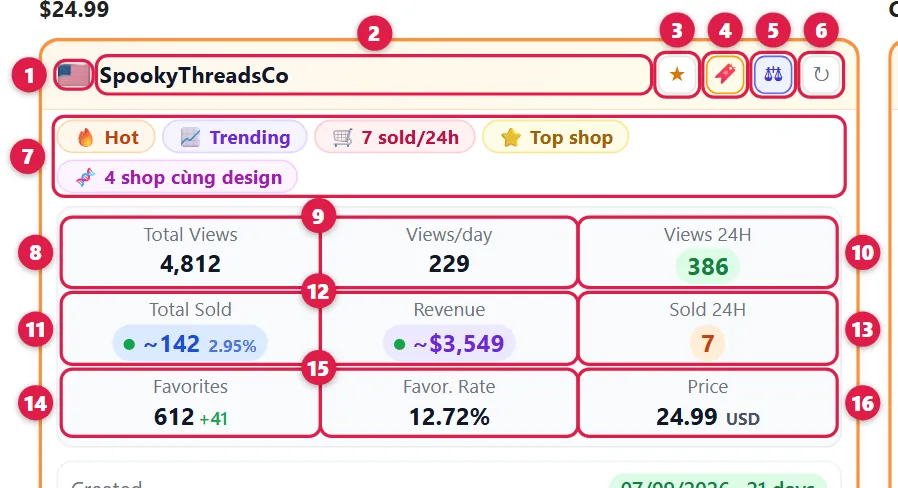
| 1 | Flag | The shop's country. An extra ✈ and small flag appear if it ships from another country. |
| 2 | Shop name | Click to open the shop. |
| 3 | ☆ Follow | Follow this shop and see its daily sales in the Followed shops tab. |
| 4 | 🔖 Save | Save the listing to Saved listings. Click again to remove it. |
| 5 | ⚖ Compare | Add to the Compare tab (up to 4 listings). |
| 6 | ↻ Refresh | Get the latest numbers. |
| 7 | Badges | 🔥 Hot: matches your highlight rules · New: listed within the last 2 weeks · 📈 Trending: 24h views well above normal · 🛒 N sold/24h: N orders in the last 24h · ⭐ Top shop: a big shop (10,000+ sales) · 🧬 N shops same design: other shops sell this design · 🏅 Bestseller / Popular now / Etsy's Pick / Star Seller: official Etsy badges. |
| 8 | Total Views | All-time views. |
| 9 | Views/day | Average views per day since the listing was published. |
| 10 | Views 24H | Views in the last 24 hours: tells you whether the listing is getting attention now. Shows ~ until an exact number is available (about 1 day after KeyLens starts tracking a listing). |
| 11 | Total Sold | Total units sold, estimated. The dot shows confidence; the small label tells how it was estimated (hover to see). high confidencemediumlow It becomes more accurate the longer KeyLens tracks the listing. |
| 12 | Revenue | Estimated revenue of the listing. Currency symbols: $ USD, C$ CAD, A$ AUD, € EUR, £ GBP. |
| 13 | Sold 24H | Orders in the last 24 hours. If KeyLens has tracked the listing for less than a day, the label shows the real number of hours (for example Sold 14H). Values with ~ are estimates. |
| 14 | Favorites | Total favorites. The small green number is new favorites in the last 24h. |
| 15 | Favor. Rate | Share of viewers who favorited. High = appealing photo and design. |
| 16 | Price | Current price. |
Bottom: dates, shop, tags
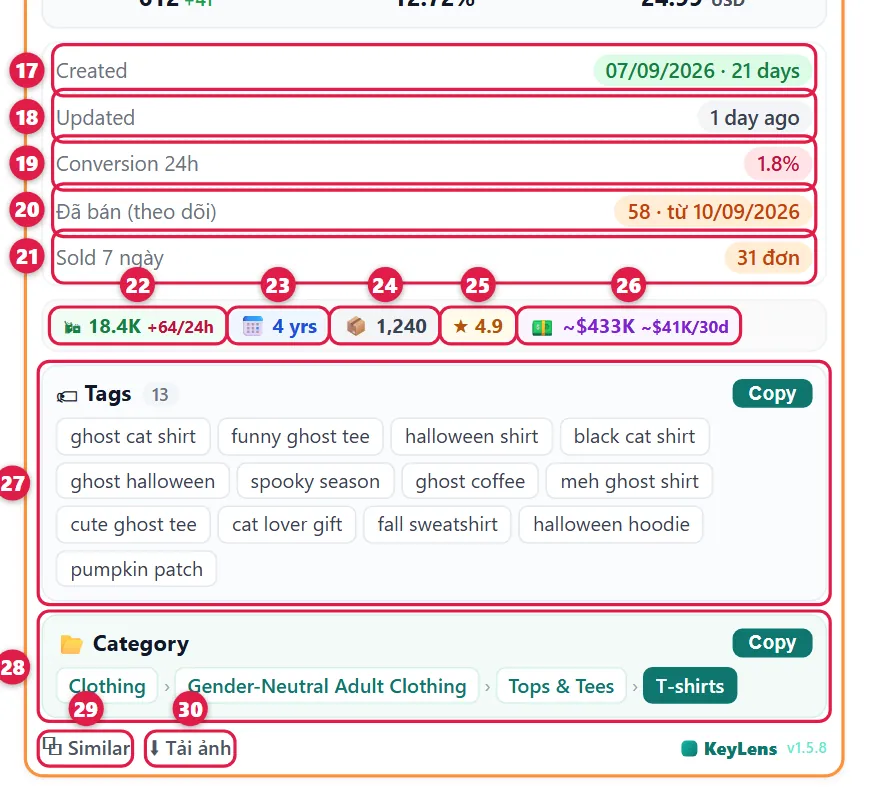
| 17 | Created | Publish date and listing age. Green: under a month, teal: under 6 months, grey: older. |
| 18 | Updated | When the seller last edited the listing. Blue if edited in the last 24h. |
| 19 | Conversion 24h | Share of viewers who bought in the last 24h. Shown only when an exact order count is available. |
| 20 | Đã bán (theo dõi) (Tracked sales) | Orders KeyLens has recorded since it started tracking the listing (date shown next to it). This is a minimum. |
| 21 | Sold 7 ngày (Sold 7 days) | Orders in the last 7 days: shows whether a listing sells steadily or in a single burst. |
| 22 | 🛍 Shop sales | Total orders of the shop. The small red number is the shop's orders in the last 24h. |
| 23 | 📅 Shop age | How long the shop has been open (mo = months, yrs = years). |
| 24 | 📦 Listings | Number of products the shop is selling. |
| 25 | ★ Rating | The shop's review rating. |
| 26 | 💵 Shop revenue | Estimated revenue: the large number is all-time, the small one is the last 30 days (or 7 days). |
| 27 | Tags | The listing's 13 tags. Click a tag to search it on Etsy, or Copy to copy them all. |
| 28 | Category | The listing's Etsy category. |
| 29 | ⧉ Similar | Open Etsy's similar products page. |
| 30 | ⬇ Tải ảnh (Download images) | Download all original, full-resolution images of the listing as one .zip file. |
Etsy listing page
On a product page the KeyLens panel sits right under the title. It is larger and adds SEO, profit and copied-design tools.
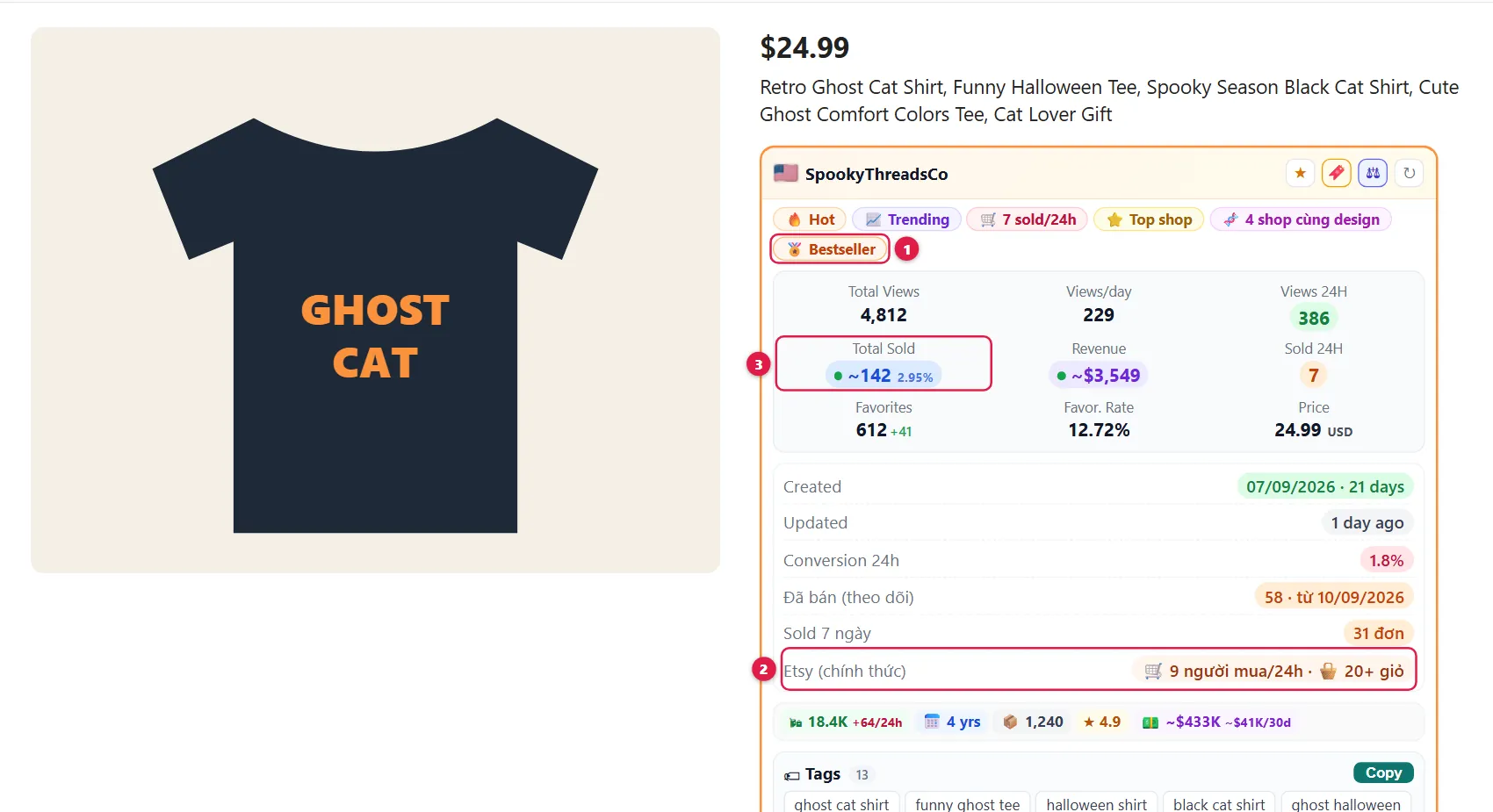
| 1 | Etsy badge | Official badges Etsy currently shows for the product (Bestseller, Popular now…). |
| 2 | Etsy (chính thức) (Official) | What Etsy itself shows on the page: people who bought in the last 24h and how many carts hold the item. A very clear sales signal. |
| 3 | Total Sold | On a listing page the sales estimate is refreshed as soon as you open it. |
🧭 Listing SEO
Checks the title and 13 tags, and suggests tags and a title. Use it on your own listings, or to learn how competitors tag.
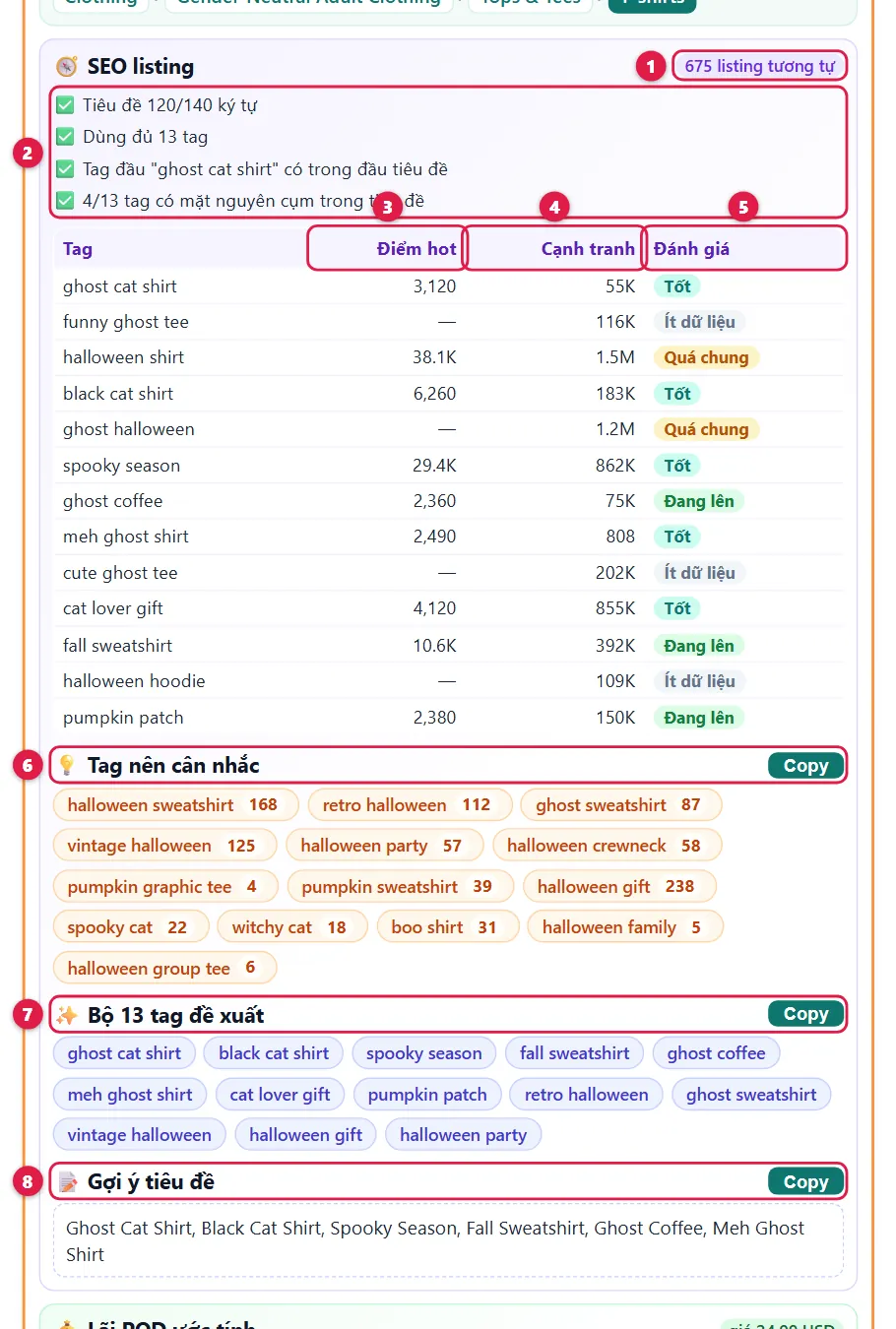
| 1 | Similar listings | How many listings on the same topic KeyLens compares against to suggest tags. |
| 2 | Title / tag checks | ✅ good · ⚠️ worth fixing · ⛔ problem. For example: title too long or too short, fewer than 13 tags, first tag not at the start of the title, words likely to break trademarks. |
| 3 | Điểm hot (Hot score) | How much buyer interest (views, favorites, purchases) the tag gets in the last 24h. — means not enough data yet. |
| 4 | Cạnh tranh (Competition) | How many products on Etsy match this tag. Bigger = harder to rank. |
| 5 | Đánh giá (Rating) | Tốt (Good): buyers are interested · Đang lên (Rising): interest growing fast · Quá chung (Too broad): over a million competitors, use a more specific phrase · Ít dữ liệu (Little data) · ⚠ Thương hiệu (Trademark): remove it to avoid takedowns. |
| 6 | Tags to consider | Tags that well-selling listings on the same topic use and this one doesn't. The small number is how many of them use it. |
| 7 | Suggested 13 tags | A ready-made set of 13 tags that keeps your main keyword first. Click Copy and paste into Etsy. |
| 8 | Suggested title | A rough title built from the suggested tags. Edit it to read naturally before using it. |
💰 Estimated POD profit
Enter your costs to see the profit per order after Etsy fees (US fee schedule). Your numbers are remembered.
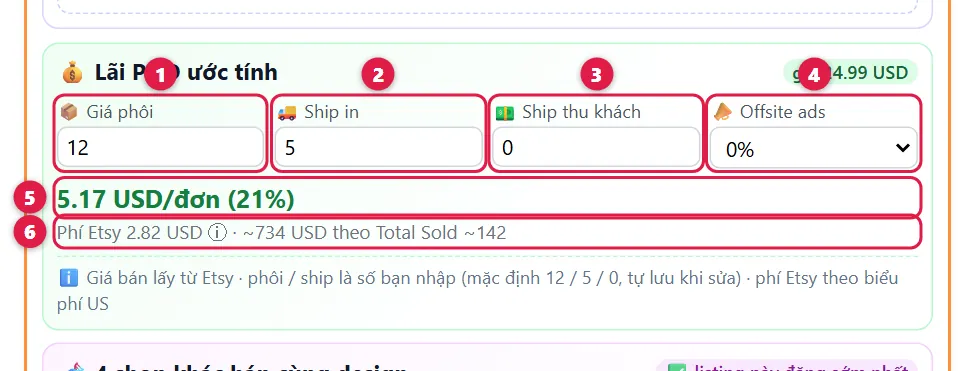
| 1 | Giá phôi (Base cost) | Blank + printing cost from your print provider (Printify, Printful, Gearment…). |
| 2 | Ship in (Provider shipping) | What your print provider charges to ship to the customer. |
| 3 | Ship thu khách (Shipping charged) | Shipping you charge on Etsy. 0 for free shipping. |
| 4 | Offsite ads | Etsy's offsite ads fee: 0%, 12% or 15% depending on your shop. Only charged when the order comes from an ad. |
| 5 | Profit per order | Profit per order and margin %. Red with a − sign means a loss. |
| 6 | Etsy fees | Total Etsy fees for one order (hover ⓘ for each fee) and estimated profit on total sales. |
🧬 Copied designs
Appears when other shops sell the same design as the product you are viewing.
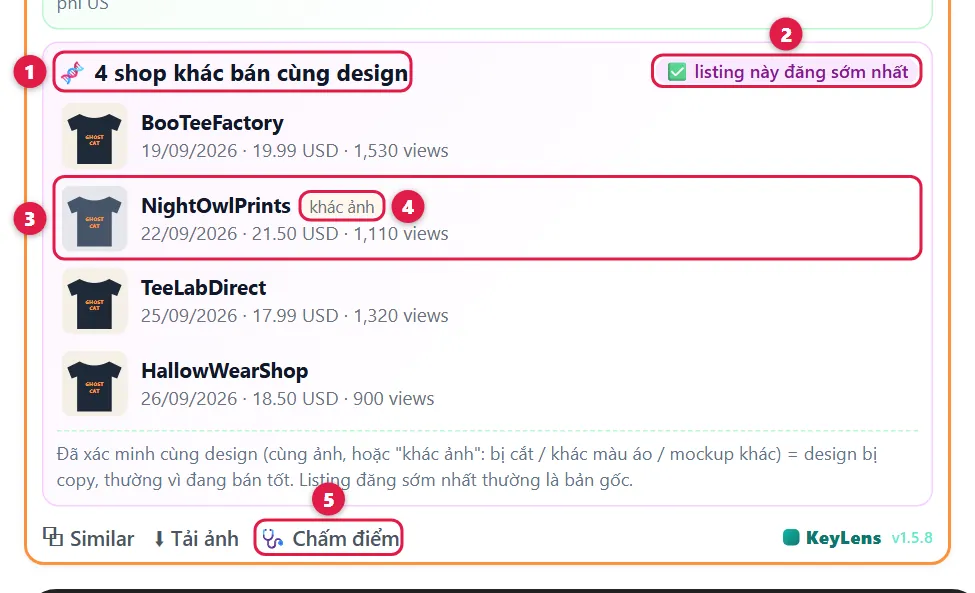
| 1 | Shop count | How many other shops sell the same design. Heavily copied designs are usually good sellers. |
| 2 | Original? | ✅ this listing was posted first: usually the original. ⚠️ an earlier listing exists: this one may be a copy. |
| 3 | Matching listing | Shop, date posted, price, views. Click to open. |
| 4 | khác ảnh (different image) | Same design on a different image (cropped, different shirt color, other mockup). |
| 5 | 🩺 Chấm điểm (Audit) | Open the Listing audit tab to compare the listing with top competitors. |
KeyLens dashboard
Open it from the popup (📊 Mở KeyLens). In every table: click a column header to sort, type in Lọc (Filter) to search, click ⬇ CSV to export to Excel / Google Sheets.
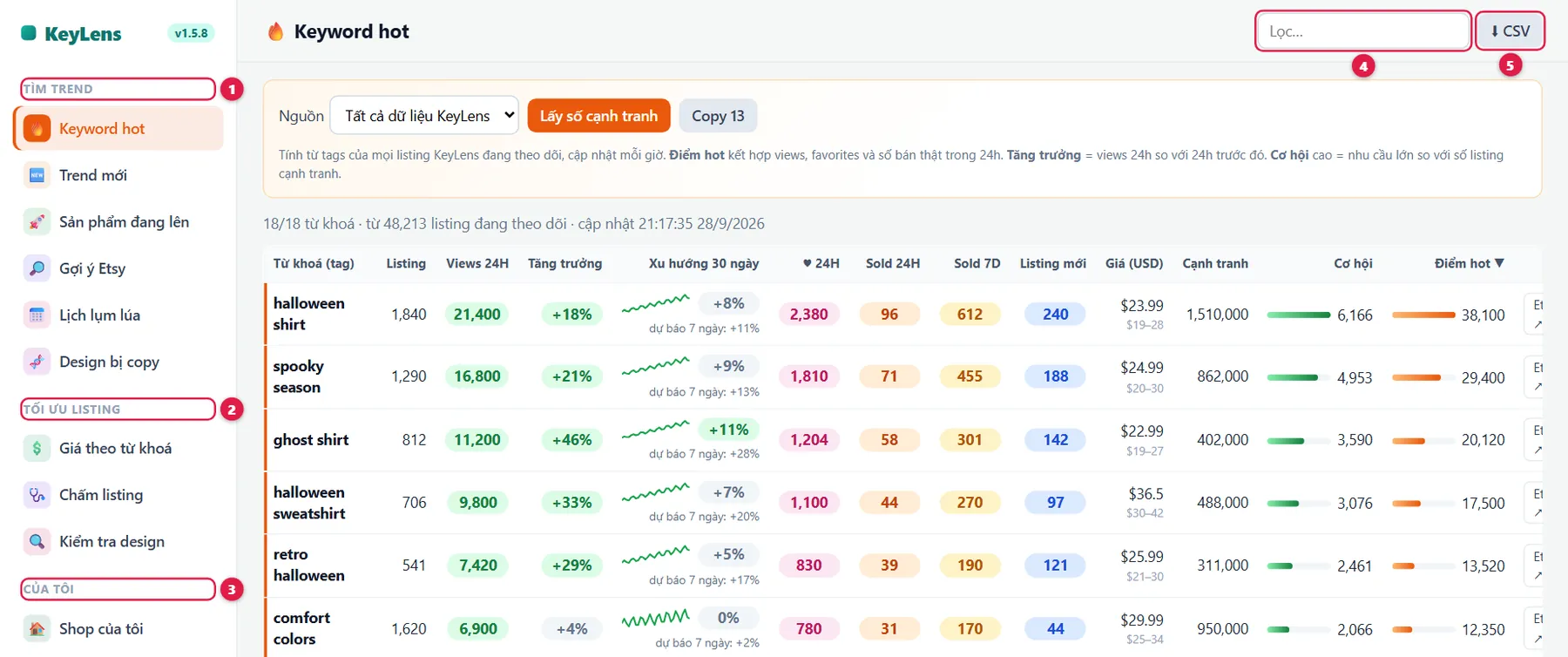
| 1 | Tìm trend (Find trends) | Keywords, products, designs on the rise, and upcoming seasons. |
| 2 | Tối ưu listing (Optimize) | Pricing, listing audit, design check before publishing. |
| 3 | Của tôi (Mine) | Your shop, niches, competitor shops, rankings, comparisons, saved listings. |
| 4 | Filter | Quickly filter the rows shown. |
| 5 | ⬇ CSV | Export exactly the rows shown. |
🔥 Hot keywords
A ranking of the tags buyers are most interested in right now, updated every hour. Use it to choose niches and tags.
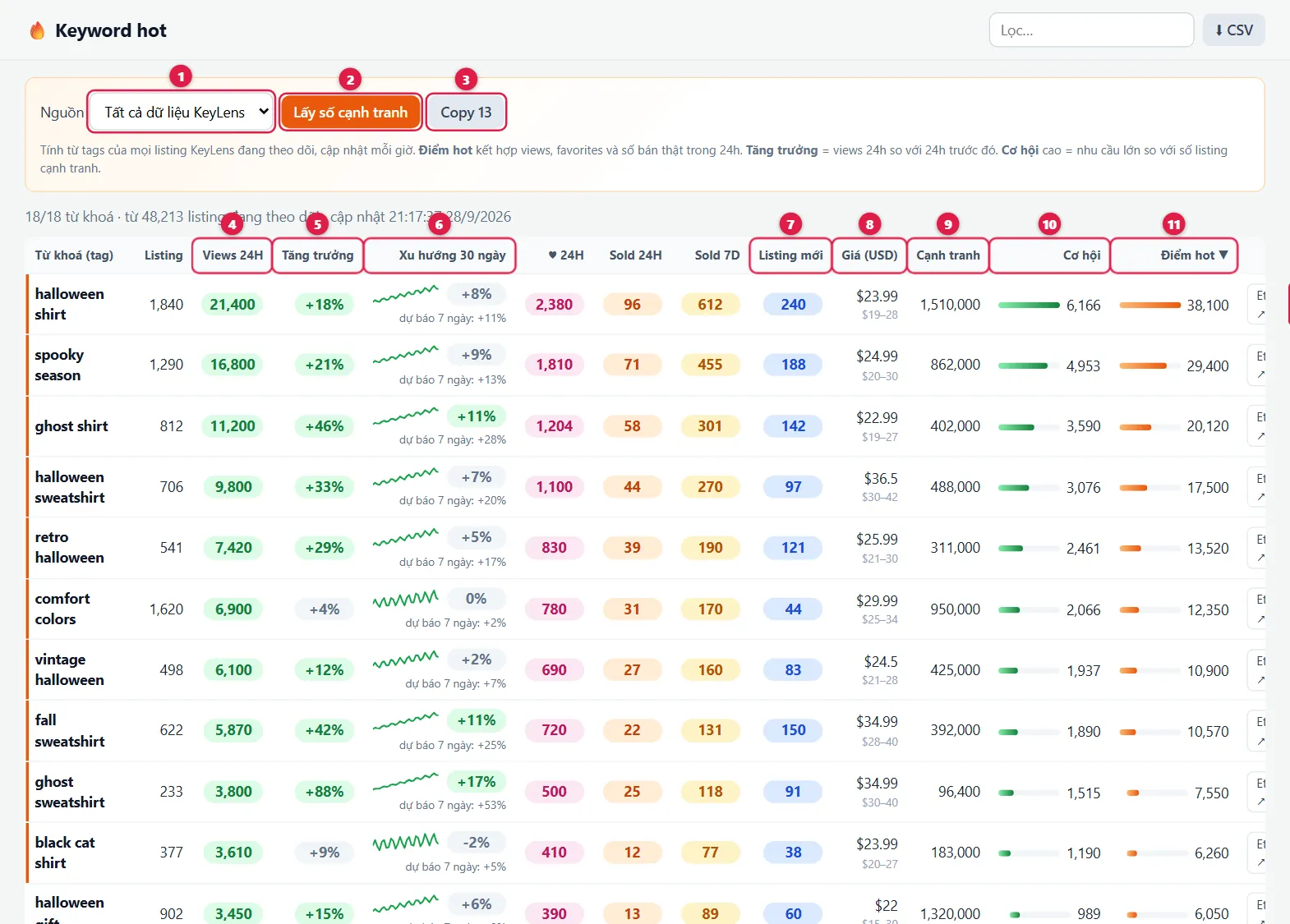
| 1 | Source | All data, or only one of your tracked niches. |
| 2 | Get competition | Fetch competition numbers for keywords shown that don't have one yet. |
| 3 | Copy 13 | Copy 13 keywords in the order shown. |
| 4 | Views 24H | 24h views of products using the tag. The Listing column is how many products use it. |
| 5 | Tăng trưởng (Growth) | Today's views versus yesterday. Green = growing, red = falling. |
| 6 | 30-day trend | The small line shows popularity over 30 days, the % versus last week, and a 7-day forecast (for reference). ♥ 24H, Sold 24H and Sold 7D are favorites and orders of products using the tag. |
| 7 | Listing mới (New listings) | Products using the tag that were published in the last 2 months. Many = sellers are piling into this niche. |
| 8 | Price (USD) | Typical price for the tag: the large number is the middle price, the small one the usual range. |
| 9 | Cạnh tranh (Competition) | How many products on Etsy match the keyword. |
| 10 | Cơ hội (Opportunity) | High demand with few competitors scores high. Prefer keywords with high opportunity. |
| 11 | Điểm hot (Hot score) | Overall buyer interest (views, favorites, purchases) in the last 24h. The top 10 rows have an orange edge. |
| 12 | ⚠ TM | The keyword contains a trademark that often gets reported (Disney, NFL, Taylor Swift…). Avoid it. |
| 13 | Etsy ↗ / + Niche | Search it on Etsy, or add it to your tracked niches. |
🆕 New trends
New keywords: phrases that just started appearing in Etsy's search suggestions in the last few days. That is new demand forming, often ahead of best-selling products.
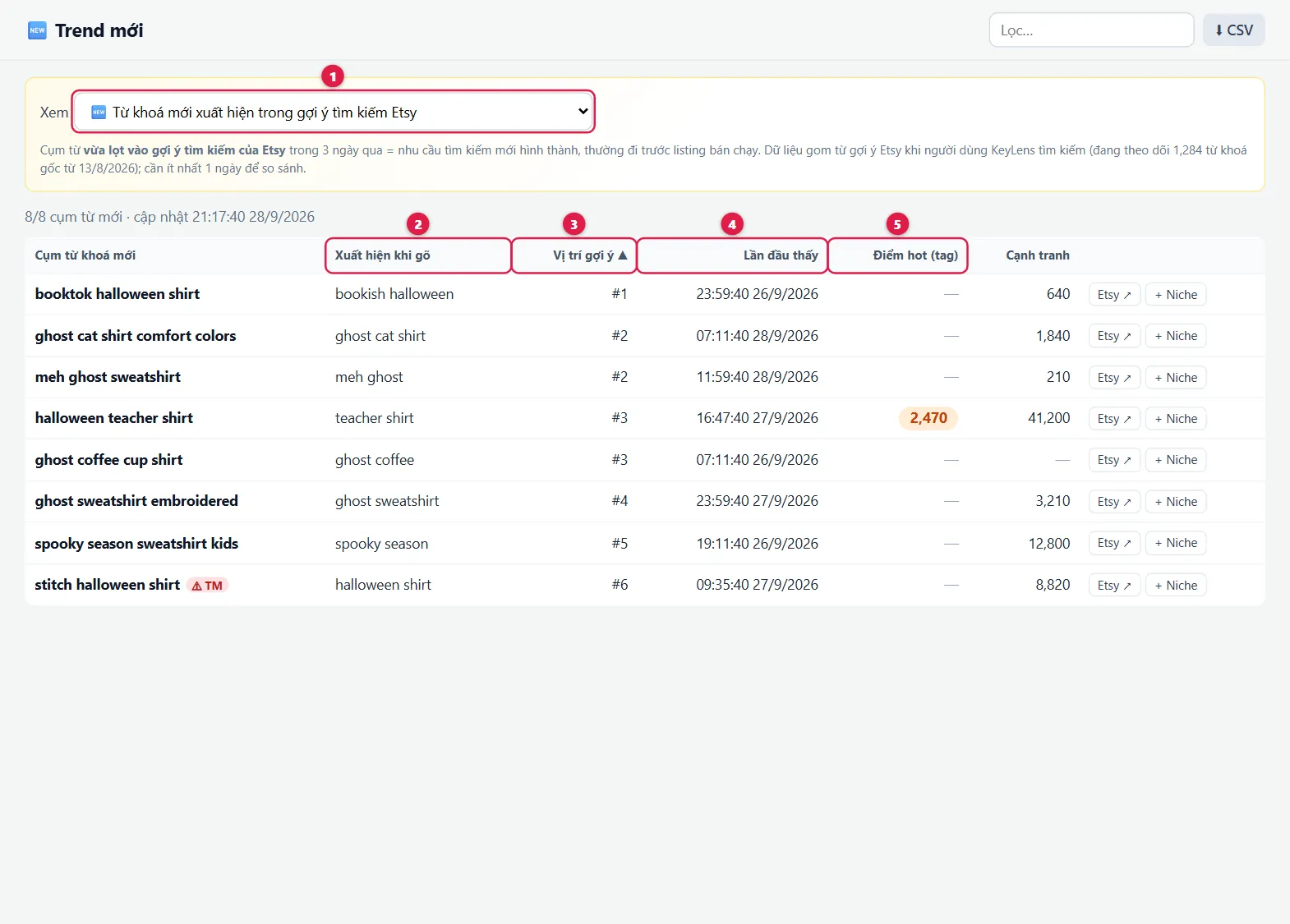
| 1 | View | Switch between New keywords and Design motifs. |
| 2 | New phrase | A phrase Etsy has just started suggesting to buyers. |
| 3 | Typed as | The base keyword that brings up this suggestion. |
| 4 | Suggestion position | #1 = top of the suggestion list, usually the most searched. |
| 5 | First seen | When the phrase started appearing. |
Design motifs: design ideas (two-word phrases from titles, such as ghost cat or ghost teacher) that are getting many views and orders. Use them for design ideas.
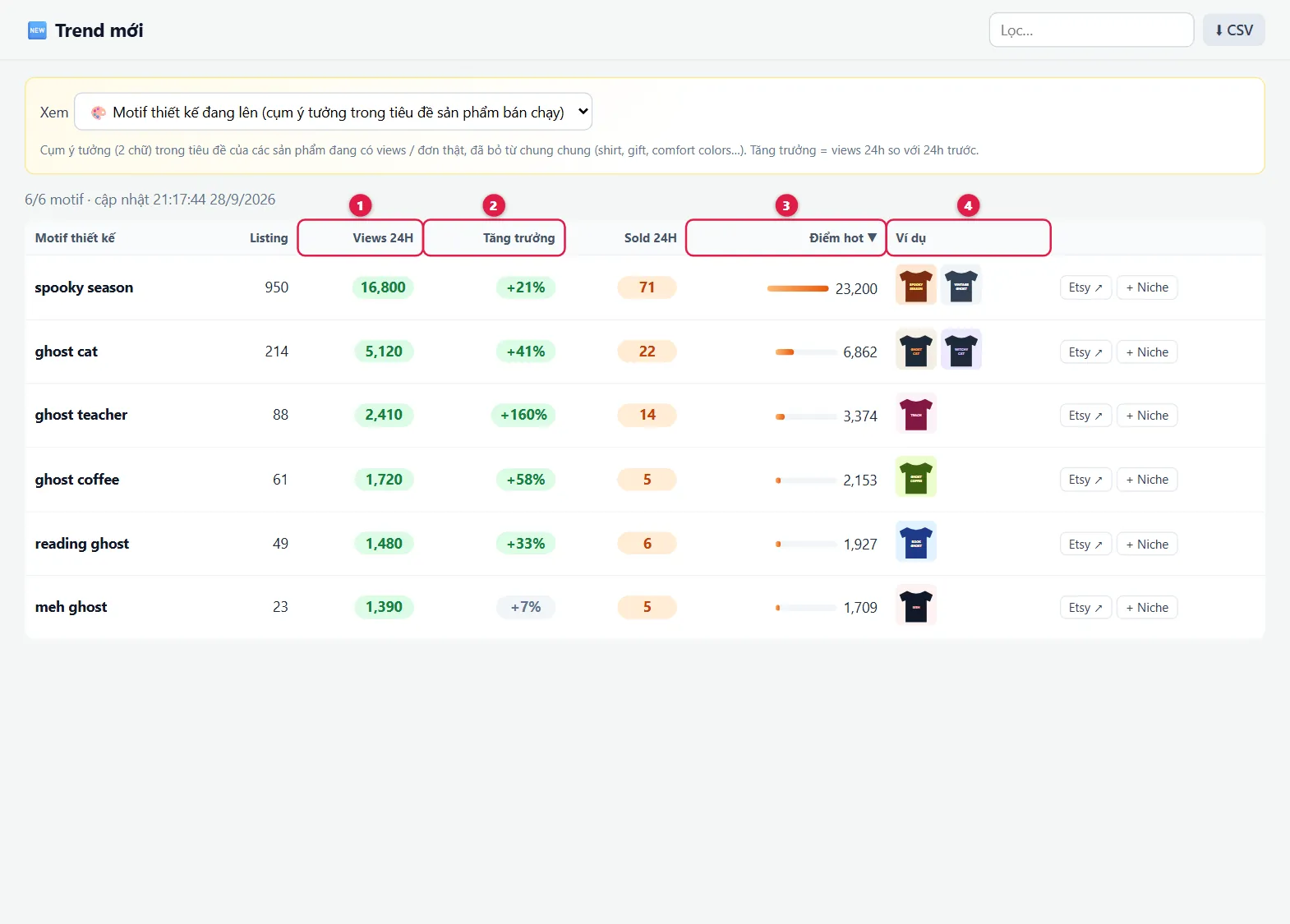
| 12 | Views 24H, Growth | 24h views and growth versus yesterday. |
| 3 | Hot score | Overall buyer interest in the motif. |
| 4 | Examples | Typical products for the motif. Click to open. |
🚀 Rising products
New products that are starting to get orders or more views, updated every hour. Use it to catch winning designs early.
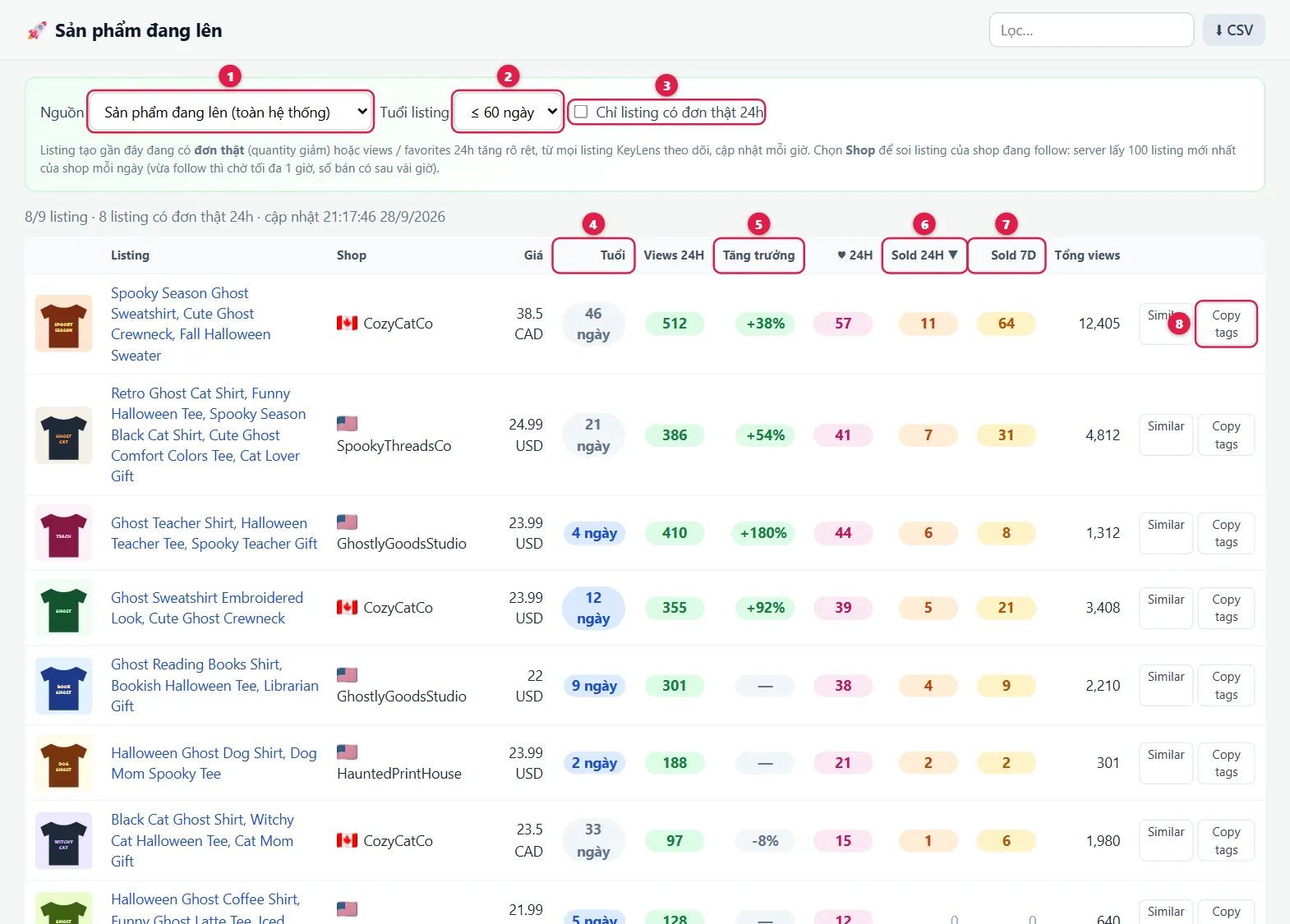
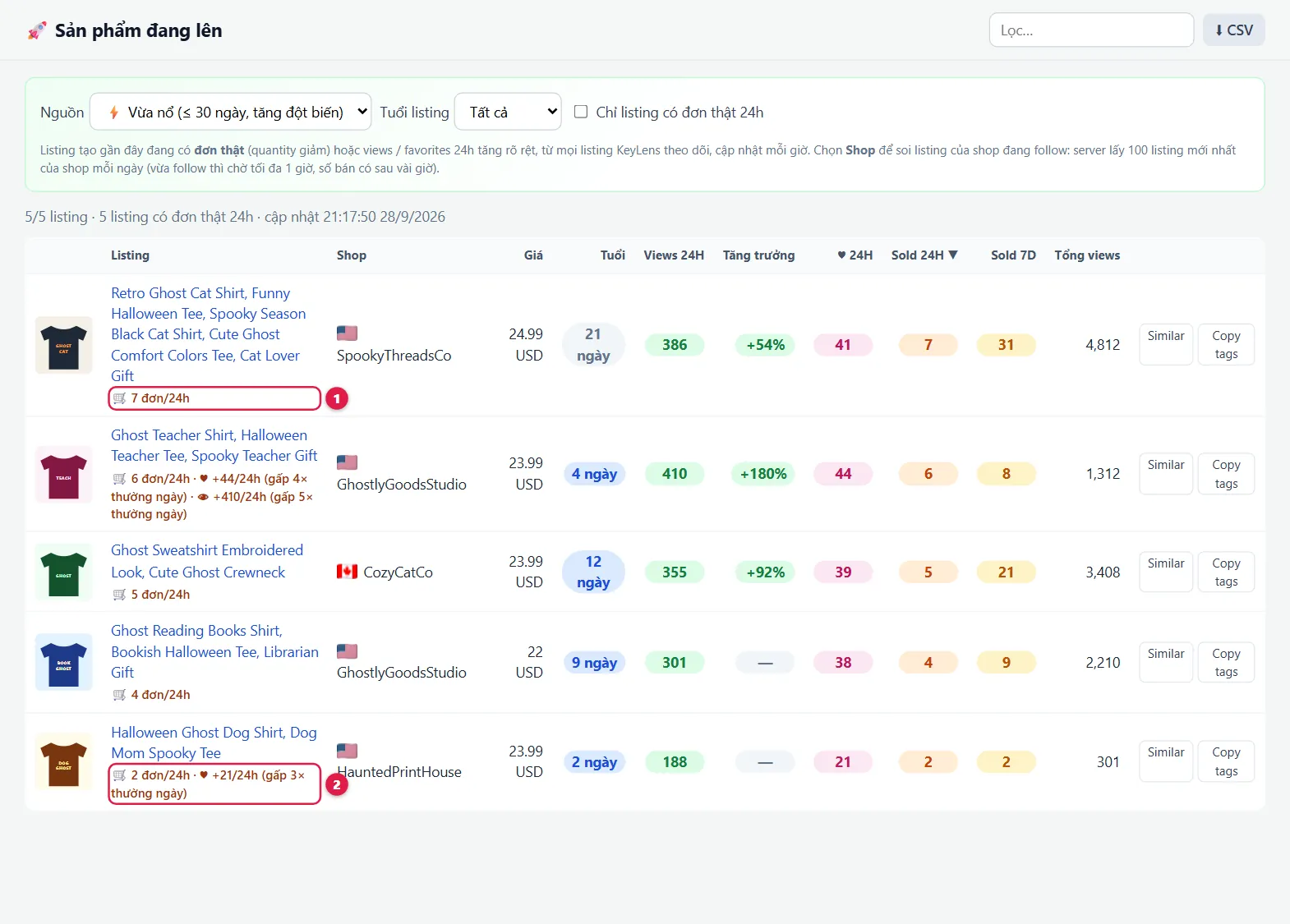
| 1 | Source | Rising products: new products (under 2 months) with orders or clearly growing views · ⚡ Just exploded: products under 1 month with a sudden jump (the reason is shown under the title) · 🏆 New designs with orders: products under 1 week that already sold · 🛒 Official Etsy signals: products where Etsy shows "N people bought this in the last 24 hours" · Niche / Shop: products of a niche or shop you track. |
| 2 | Listing age | Only show products published within the chosen period. |
| 3 | Only with orders | Hide products with no orders in the last 24h. |
| 4 | Tuổi (Age) | Days since publishing. Blue = under 2 weeks. |
| 5 | Growth | Today's views versus yesterday. |
| 67 | Sold 24H, Sold 7D | Orders in the last 24h and 7 days. |
| 8 | Copy tags | Copy the product's 13 tags. Similar opens similar products on Etsy. The ☆ Follow button in the Shop column follows that shop. |
🔎 Etsy suggestions
Expand a base keyword into a list of long-tail phrases buyers actually type on Etsy.
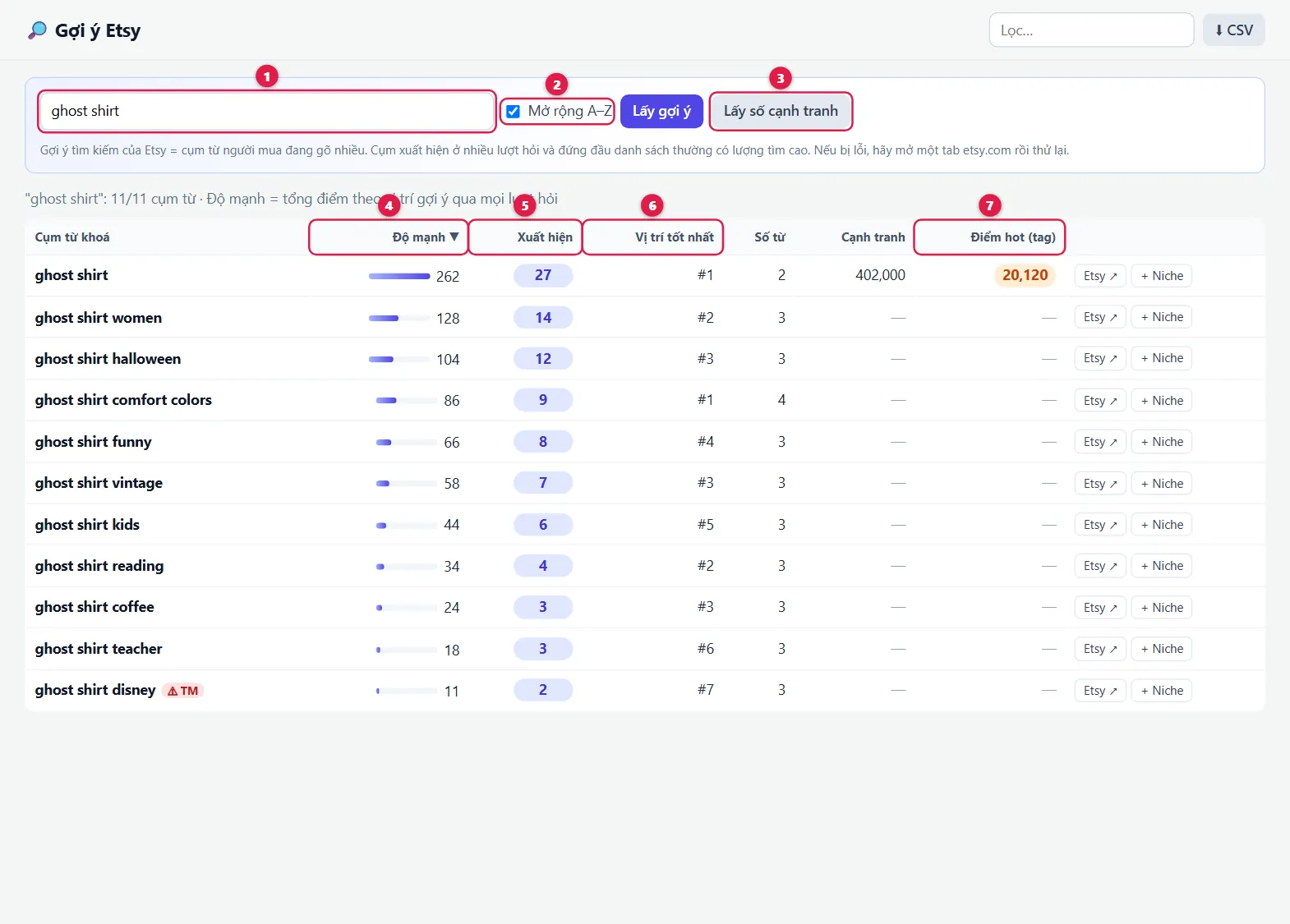
| 1 | Base keyword | For example ghost shirt, then click Lấy gợi ý (Get suggestions). |
| 2 | Expand A–Z | Also ask for variations (ghost shirt a, ghost shirt b…) to find more phrases. |
| 3 | Get competition | Fetch competition numbers for the phrases shown. |
| 4 | Độ mạnh (Strength) | Stronger phrases are typed more often by buyers. |
| 5 | Xuất hiện (Appearances) | How many times the phrase appeared across suggestion lists. |
| 6 | Best position | Its highest position in Etsy's suggestion list. |
| 7 | Hot score (tag) | The hot score if the phrase is also a hot tag. |
📅 Season calendar
US POD events: when to start listing, which seasons are heating up, and which keywords to use.
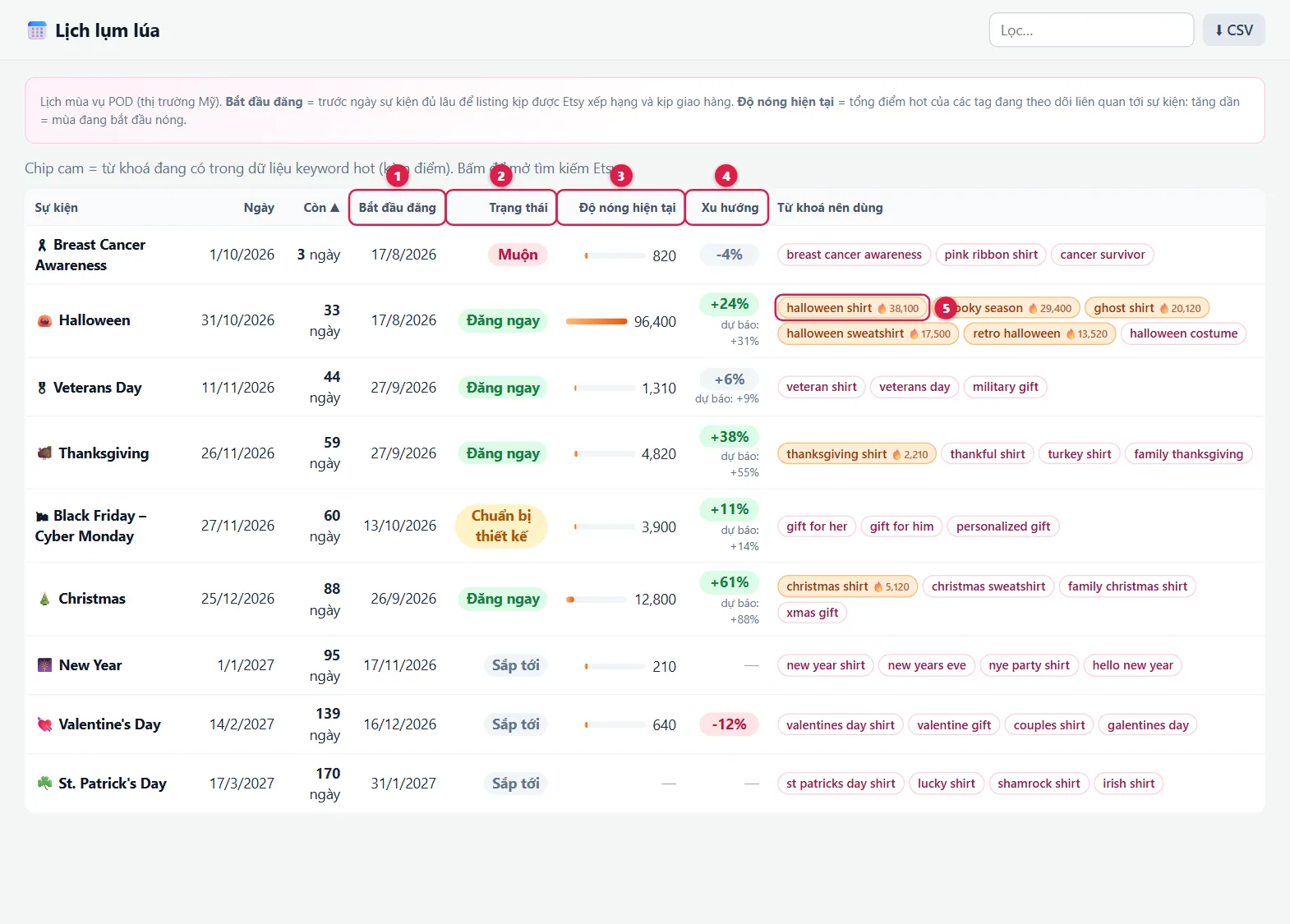
| 1 | Start listing | When to start publishing so listings can rank and ship in time for the event. |
| 2 | Status | Đăng ngay (List now): right on time · Chuẩn bị thiết kế (Prepare designs): listing time is near, design now · Muộn (Late): under 2 weeks left, push existing listings only · Sắp tới (Upcoming): still far off. |
| 3 | Current heat | How much buyers care about the season right now. |
| 4 | Trend | Heat versus last week, with a forecast. Rising = the season is starting. |
| 5 | Keywords to use | Orange chips = hot keywords right now (with 🔥 score), pink chips = suggested seasonal keywords. Click to search Etsy. |
🧬 Copied designs
Designs being sold by several shops. A design copied by many shops is usually selling well, and the earliest listing is usually the original.
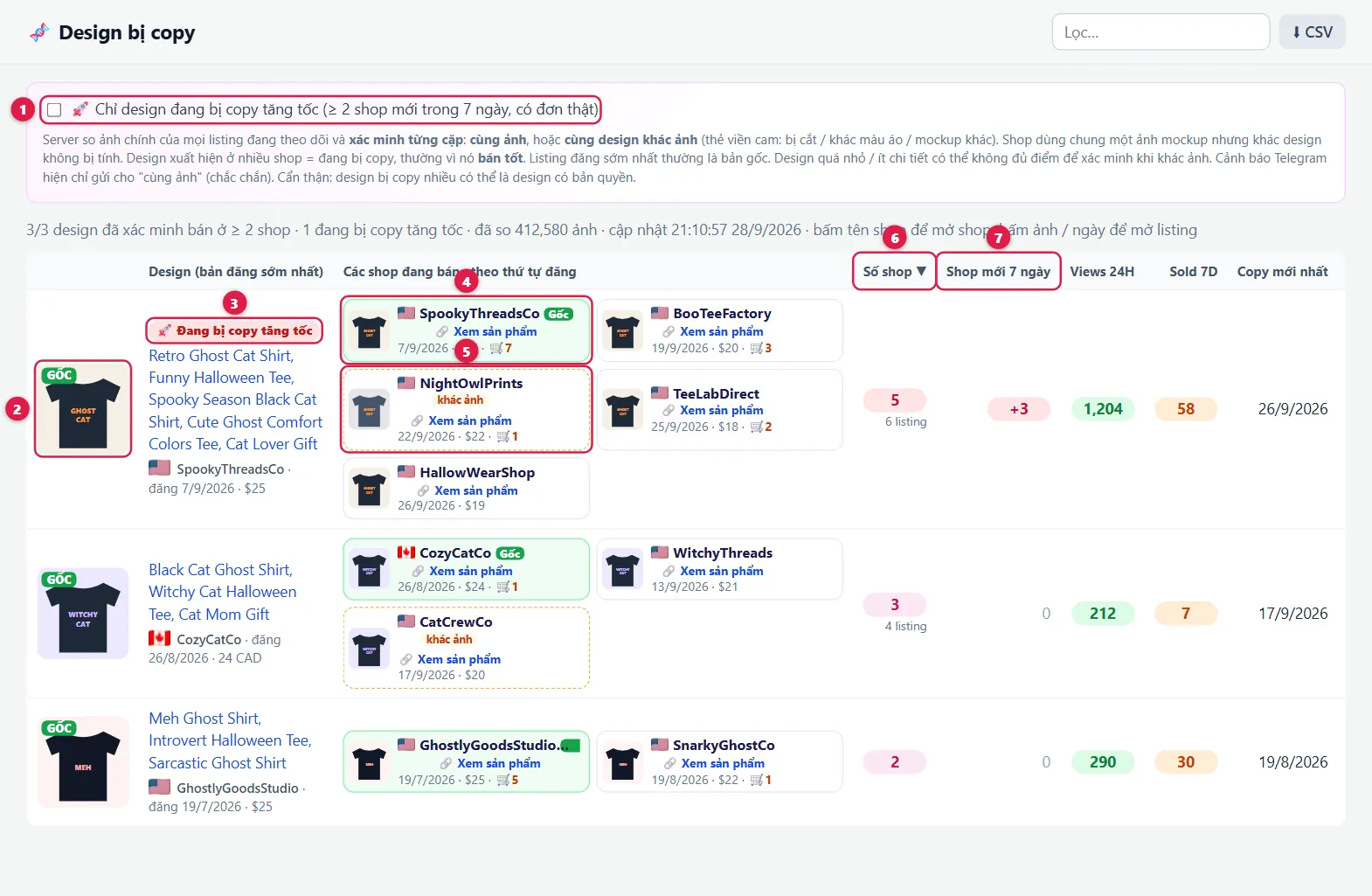
| 1 | Copies accelerating | Only show designs many new shops copied in the past week that are getting orders: a sign of a winning design. |
| 2 | GỐC (Original) | The earliest listing of the design. |
| 3 | 🚀 Copies accelerating | Label for designs being copied rapidly. |
| 4 | "Gốc" card | The first shop to list it. Cards are ordered by date; each shows date, price and 24h orders. Click the shop name to open the shop, Xem sản phẩm (View product) to open the listing. |
| 5 | Orange dashed card "khác ảnh" | Same design, different image (cropped, other shirt color, other mockup). |
| 6 | Số shop (Shops) | Number of shops selling the design. Red = 5 or more. |
| 7 | New shops 7 days | Shops that started selling the design in the past week. |
💲 Price by keyword
Enter a keyword to see what competitors charge and which price range sells best.
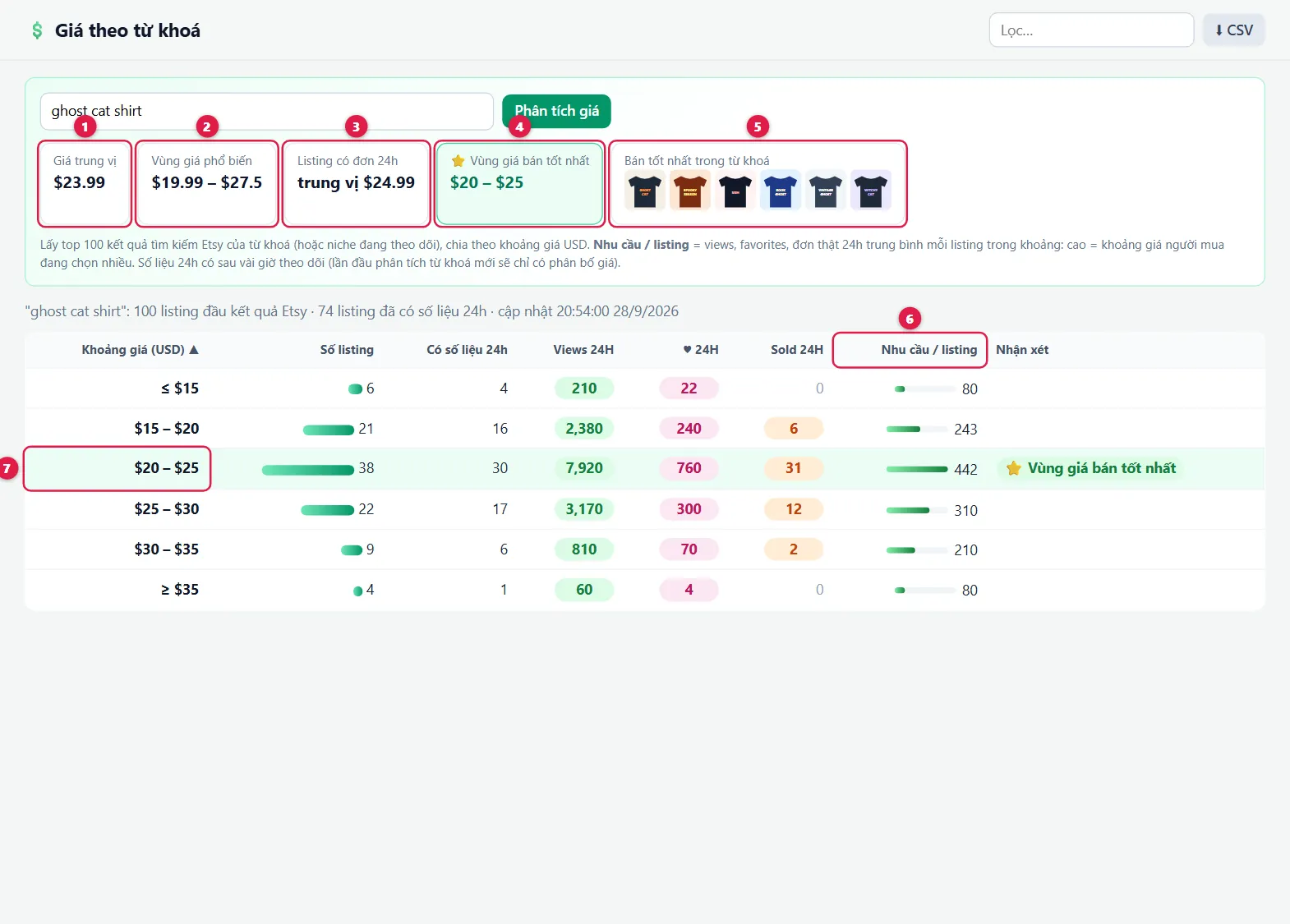
| 1 | Median price | The middle price: half the competitors are cheaper, half more expensive. |
| 2 | Common range | The price range most competitors use. |
| 3 | Listings with orders | Prices of products that just sold. |
| 4 | ⭐ Best-selling price range | The range buyers pick most. Price within this range. |
| 5 | Top sellers | The best-selling products for the keyword. Click to open. |
| 6 | Demand per listing | How much interest each product in the range gets. |
| 7 | Green row | The best-selling price range. |
🩺 Listing audit
Paste your listing link (and the keyword you want to rank for) to score it against the top 20 competitors on Etsy. Also available from the 🩺 Chấm điểm button on the listing page.
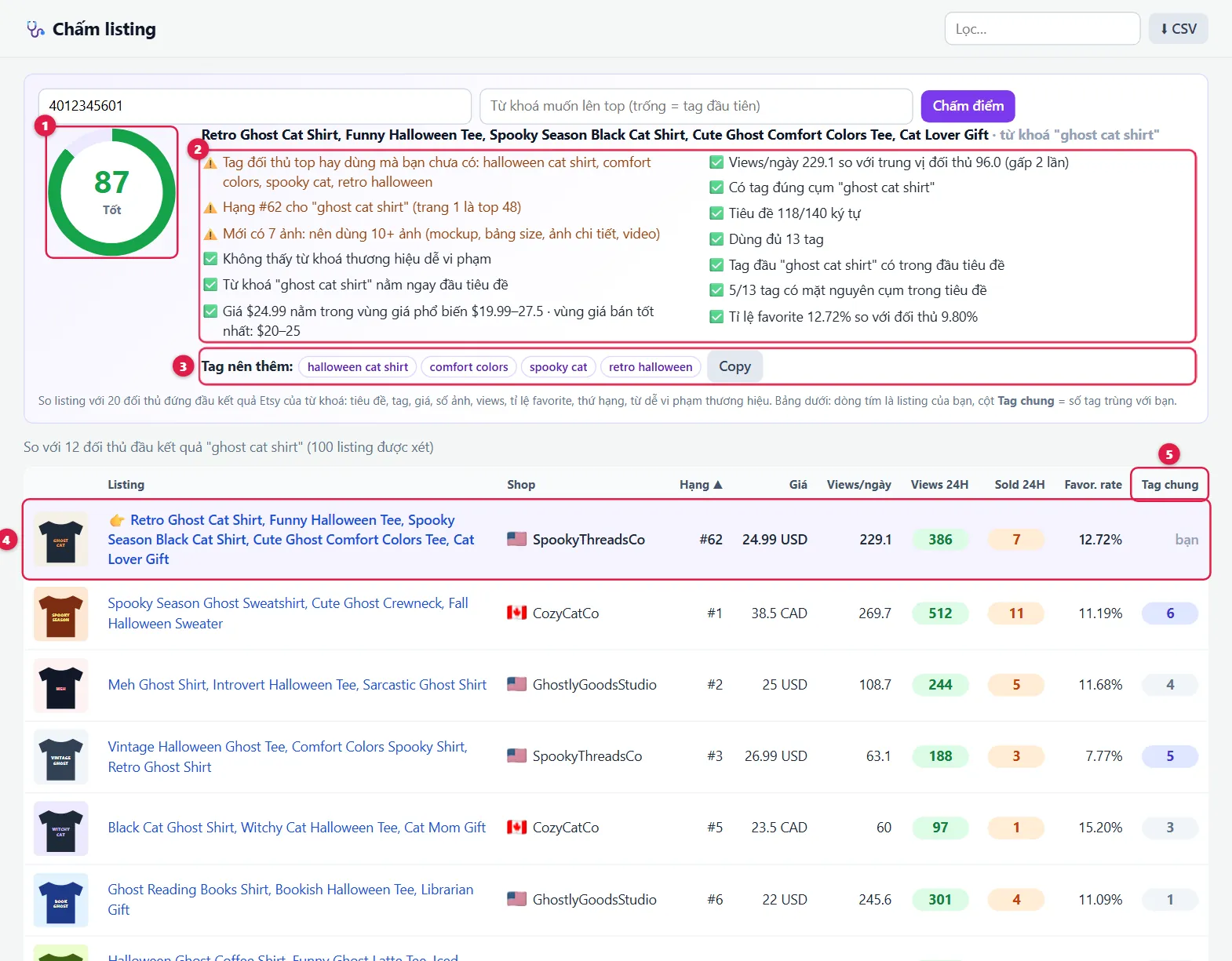
| 1 | Score 0–100 | Tốt (Good) 80+ · Khá (Fair) 60+ · Trung bình (Average) 40+ · below 40 Yếu (Weak). |
| 2 | Checks | Title, tags, price versus competitors, photo count, views, favorite rate, ranking, trademark words. Fix the ⚠️ and ❌ lines to raise the score. |
| 3 | Tags to add | Tags many top competitors use that you don't. Click Copy to use them. |
| 4 | Purple row | Your listing, to compare directly with the competitors below. |
| 5 | Tag chung (Shared tags) | How many of the competitor's tags match yours. |
🔍 Design check
Before publishing: check whether any shop already sells your design and whether the title contains risky trademark words.
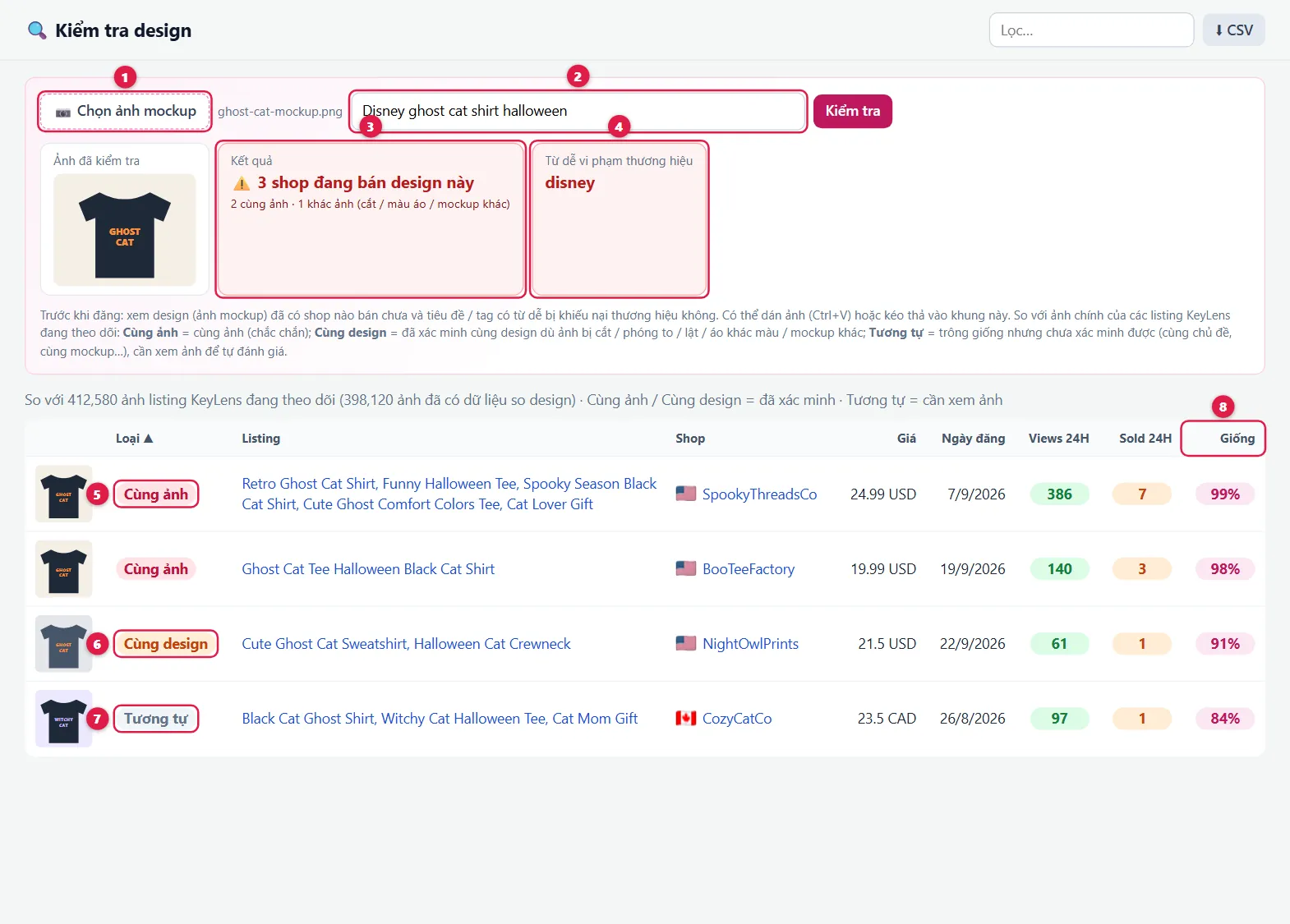
| 1 | Choose mockup | Pick a file, paste an image (Ctrl+V) or drag and drop it. |
| 2 | Title / tags | Optional, used to check for trademark words. |
| 3 | Result | How many shops sell this design, or ✅ none found. |
| 4 | Risky words | Trademark words found. Remove them before publishing. |
| 5 | Cùng ảnh (Same image) | Uses this exact image: a certain match. |
| 6 | Cùng design (Same design) | Same design on a different image (cropped, zoomed, flipped, other shirt color or mockup). |
| 7 | Tương tự (Similar) | Looks alike but not confirmed as the same design. Check the image yourself. |
| 8 | Giống (Match) | How similar the two are (%). |
🏠 My shop
Add your own shop (up to 3) to track orders and best sellers, and to find out when other shops copy your designs.
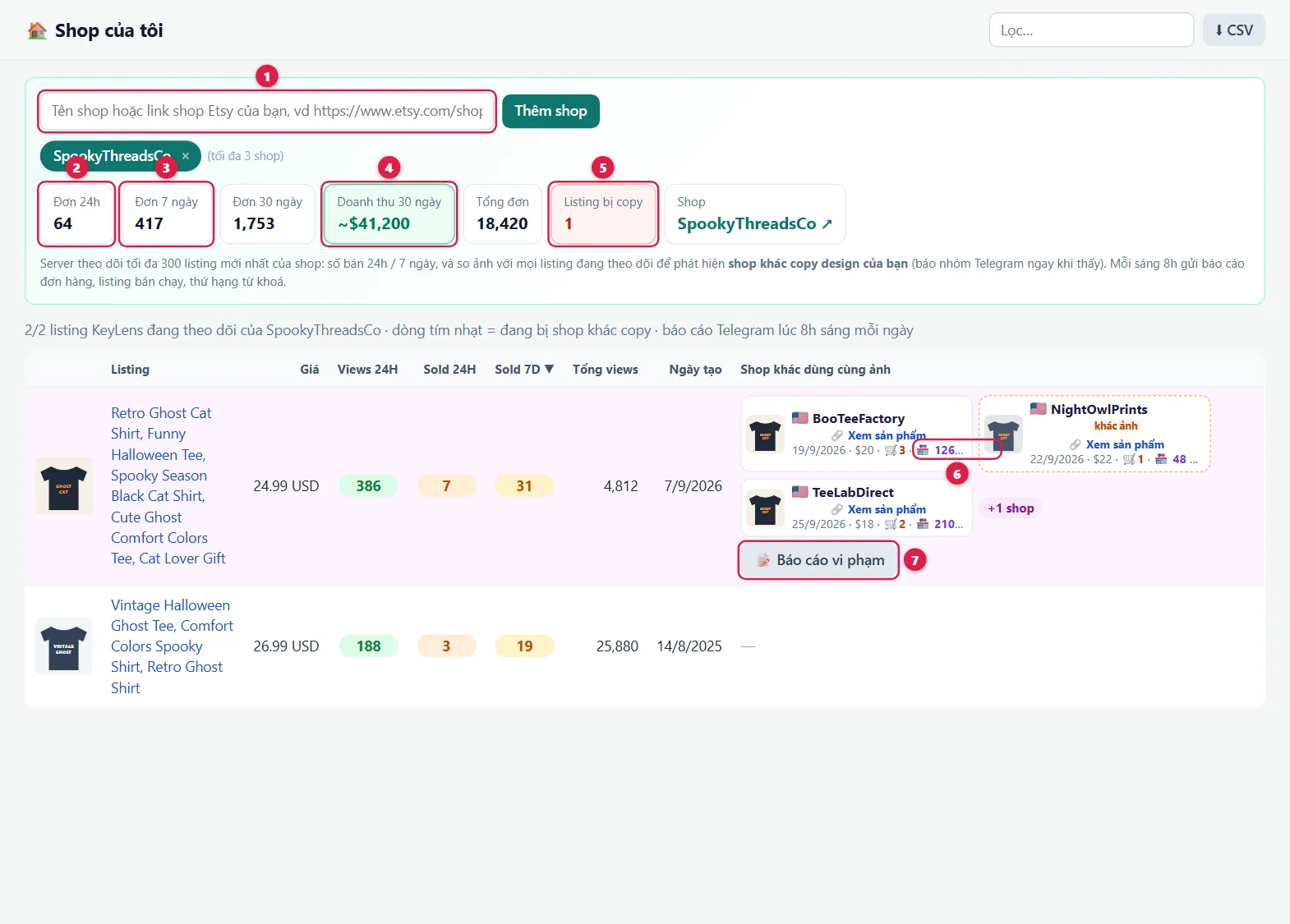
| 1 | Add shop | Enter your shop name or Etsy shop link. |
| 2 | Orders 24h | Orders in the last 24h. |
| 3 | Orders 7 / 30 days | Orders in 7 and 30 days (available after a few days of tracking). |
| 4 | Revenue 30 days | Estimated revenue over 30 days. |
| 5 | Copied listings | How many of your listings other shops sell with the same design. Light purple rows in the table are copied listings. |
| 6 | 🏪 N orders/7d | 7-day orders of the shop copying you. |
| 7 | 📝 Báo cáo vi phạm (Report) | A ready-to-send copyright report (in English) with links to your original and each copy. Follow the steps in the dialog to send it through the Etsy Reporting Portal. Only report designs you created. |
🎯 Tracked niches
Add niche keywords you care about (up to 50). KeyLens tracks the top products for each keyword every day.
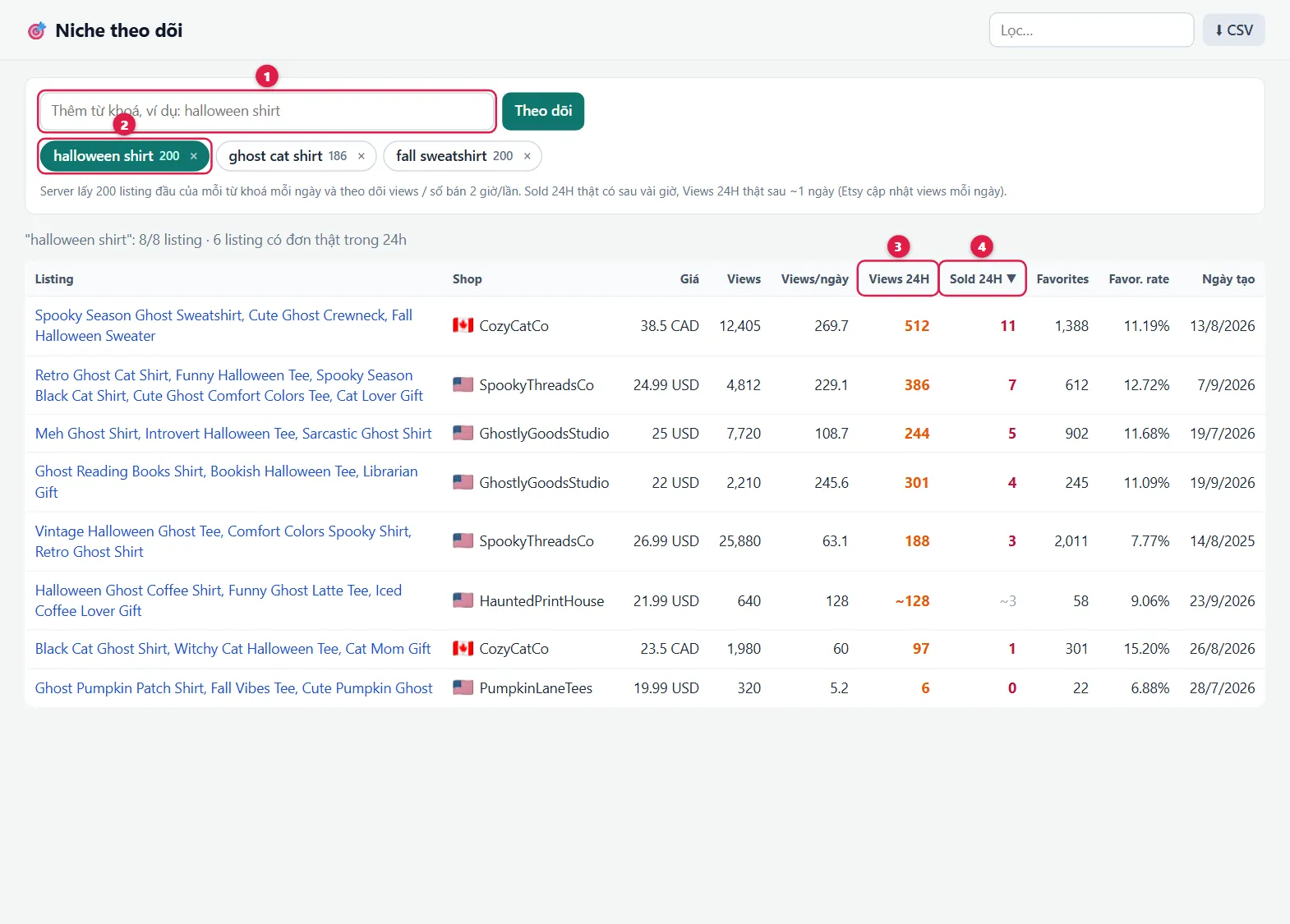
| 1 | Add keyword | For example halloween shirt, then click Theo dõi (Track). |
| 2 | Niche chip | Click to view the niche's products, × to stop tracking. The number is how many products are tracked. |
| 3 | Views 24H | ~ means less than a day of tracking so far. |
| 4 | Sold 24H | Red = recorded orders. Grey with ~ = estimate. |
🏪 Followed shops
Competitor shops you followed with ☆ Follow. Numbers update every few hours.
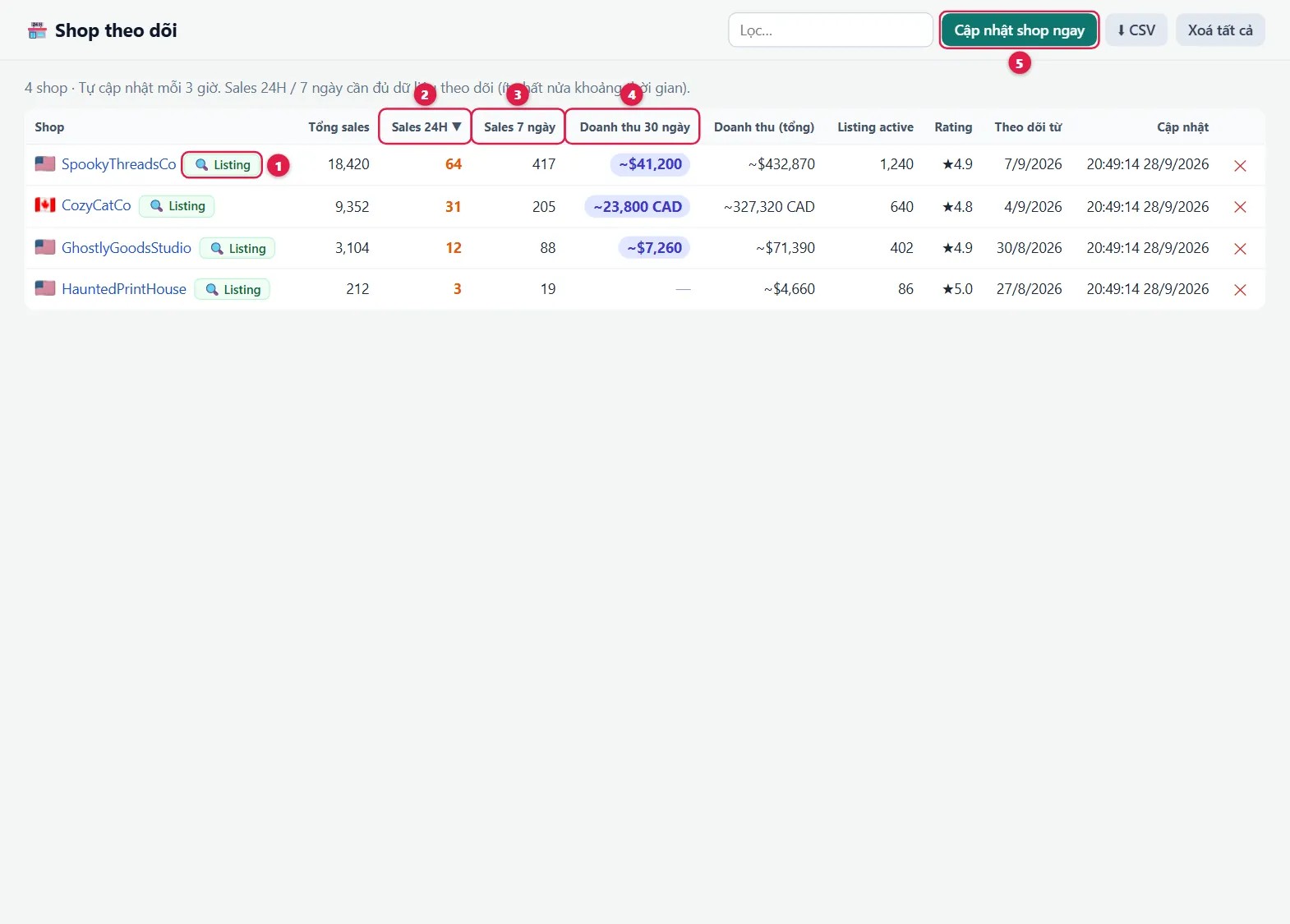
| 1 | 🔍 Listing | See the shop's products: which are selling and which are new. |
| 2 | Total sales | The shop's total orders. |
| 3 | Sales 24H | Orders in the last 24h. |
| 4 | Sales 7 days | Orders in 7 days (available a few days after following). |
| 5 | Update now | Refresh the list without waiting. |
📍 Rank tracking
Track where your listing ranks in Etsy search for the keywords you target (up to 5 pairs), checked daily.
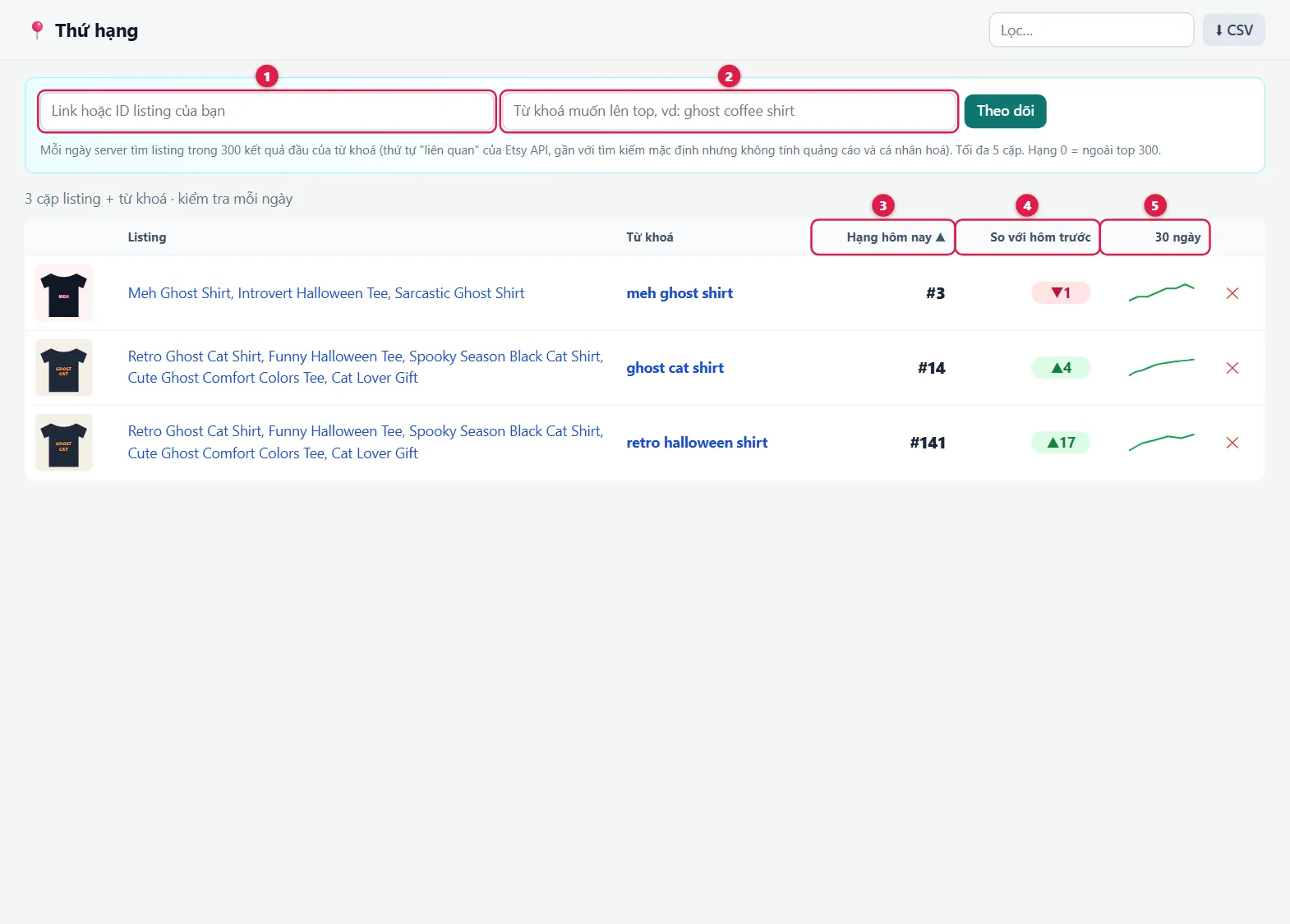
| 12 | Listing + keyword | Paste the listing link and keyword, then click Theo dõi (Track). |
| 3 | Today's rank | Position within the top 300 results. >300 = not in the top 300 yet. Your actual rank on Etsy may differ slightly because of ads and personalization. |
| 4 | Versus yesterday | Green ▲ = moved up, red ▼ = dropped. |
| 5 | 30 days | 30-day ranking chart. |
⚖️ Compare
Put 2–4 listings side by side and compare every number.
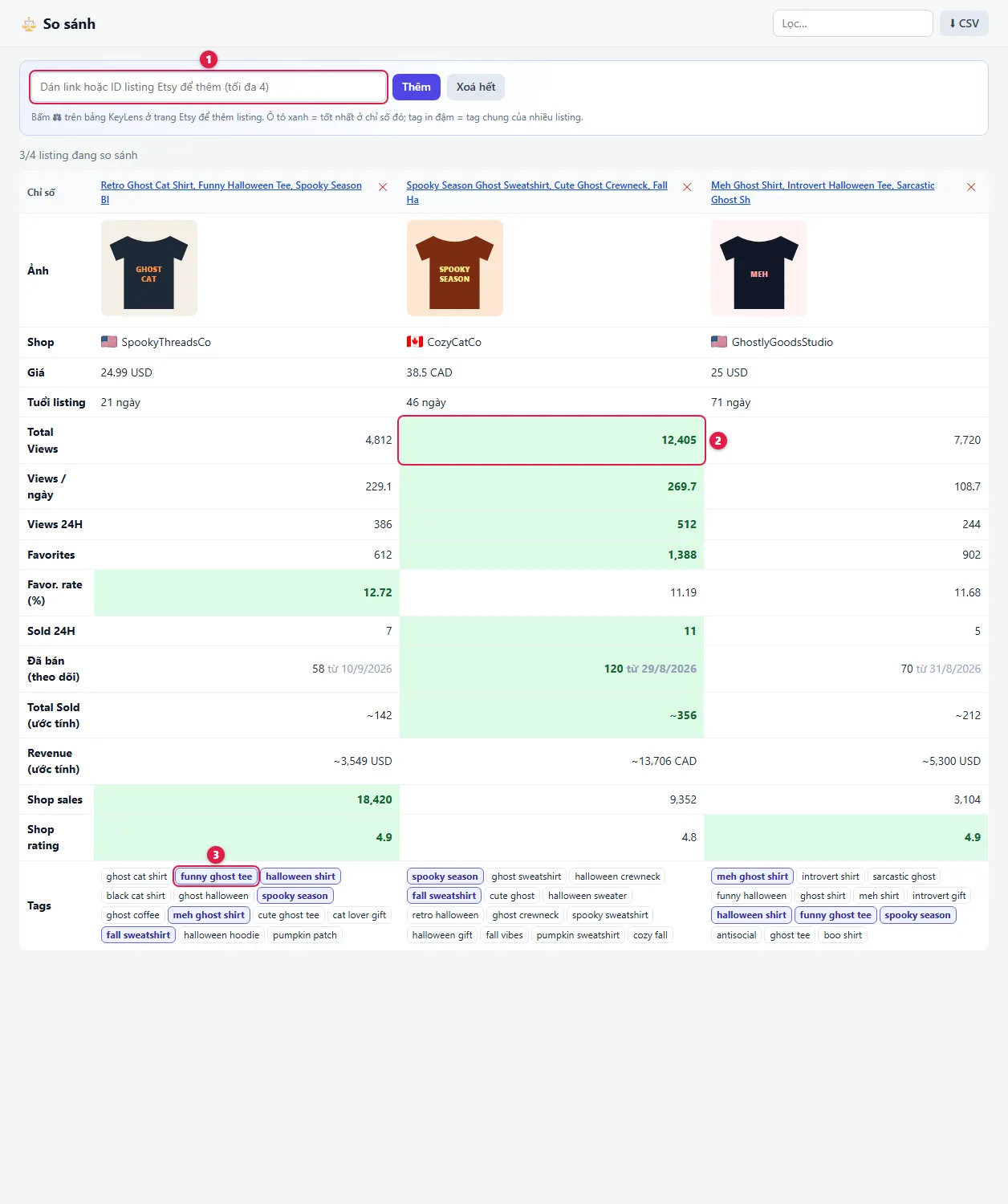
| 1 | Add listing | Paste a listing link, or click ⚖ on a KeyLens panel on Etsy. |
| 2 | Green cell | The best listing for that number. |
| 3 | Bold tag | A tag shared by several listings: the good sellers all use it. |
🔖 Saved listings
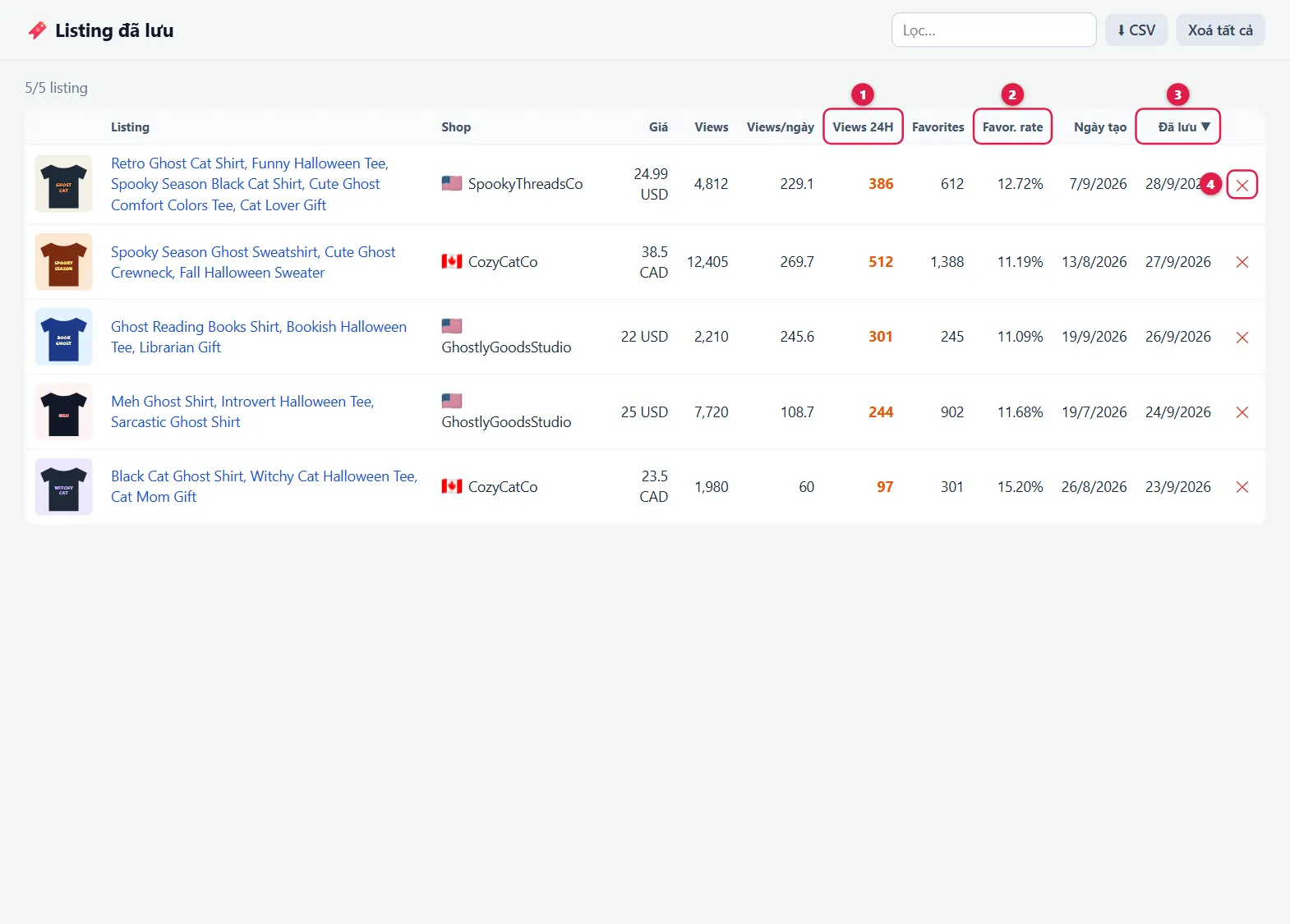
Listings you saved with 🔖, or that were saved automatically for matching your highlight rules. The list is stored on your computer; numbers are as of when you saved them.
Frequently asked questions
Why do some cells show "—" or "~"?
— means no data yet. ~ means an estimate. For listings KeyLens has just started tracking: 24h orders appear after a few hours, exact 24H views after about a day, and Total Sold gets more accurate over several days.
Are the numbers exact?
Views, favorites, prices, tags and shop sales come straight from Etsy. Total Sold, Revenue and shop revenue are estimates (marked ~) for reference: Etsy does not publish per-listing sales.
Are "hot", "rising" and "copied designs" based on all of Etsy?
No. KeyLens uses a large set of products it tracks. The more niches are tracked, the more complete the data.
Etsy suggestions show an error?
Open (or reload) an etsy.com tab and try again.
Not getting alert notifications?
On Windows: Settings → System → Notifications, turn it on for Google Chrome and turn off Do not disturb. Use the Thử thông báo (Test notification) button in the popup to check.
Is the trademark list complete?
It covers brands that are often reported, for reference only, and is not legal advice. Double-check any design that uses famous names, characters or logos.